Free Fake Instagram DM Dark Mode Generator
Build the same dark Instagram DM your audience already scrolls past every night. Verified badge, seen status, reactions, story replies, group threads — every native cue, in the black UI people actually screenshot.
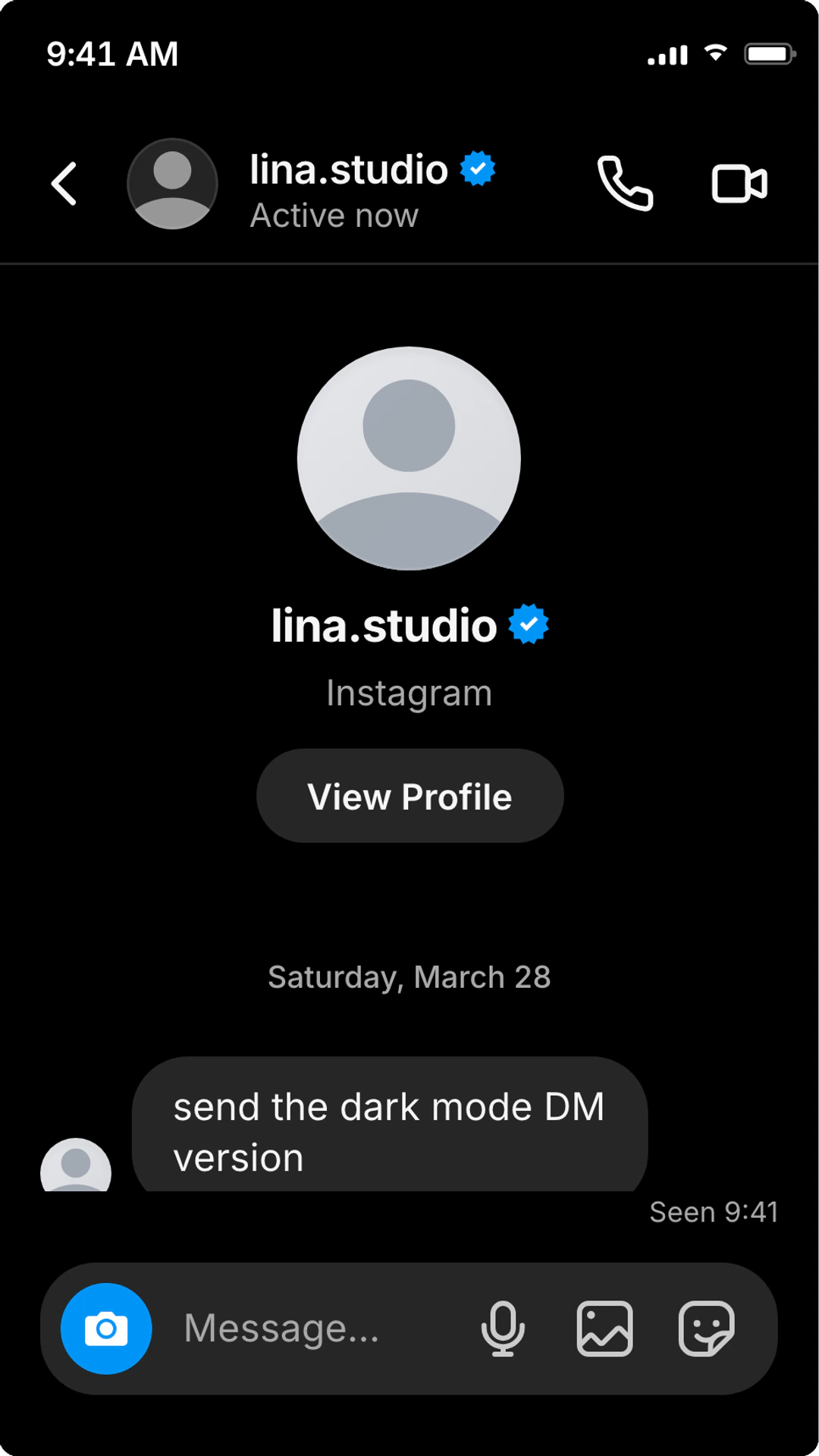
Dark mode export details
Concrete export settings, delivery details, and workflow notes to help you understand the output before you create it.
Theme
Native Instagram dark
Header, message bubbles, tab bar, story replies, and reactions render in the dark UI Instagram ships on iOS and Android.
Output
Screenshots + video
Export a sharp screenshot or an animated chat video without rebuilding the conversation. Both honour the dark theme.
Aspect ratio
9:16 ready
Vertical export fits TikTok, Instagram Reels, and YouTube Shorts without crop or letterbox.
Watermark
Removable
PNG exports are watermark-free for signed-in accounts. Pro removes watermarks on guest exports and unlocks video and animation.
Built for the dark Instagram UI
Every detail people screenshot at night — verified badges, reactions, seen status, group threads — tuned for the dark theme.
- Pixel-matched Instagram dark mode header, bubbles, and tab bar
- Verified blue badge that stays legible against the dark gradient
- Heart, fire, and custom emoji reactions tuned for dark bubbles
- Seen status, typing dots, and time stamps in muted dark-UI gray
- DM request, message, and group-thread scenes in black Instagram UI
- Story-reply bubbles with the native dark Instagram preview style
- Group DM threads with multiple participants in dark mode
- One-click toggle so you can ship dark and light versions of the same scene
- Screenshot and animated chat exports — both render in dark UI
Native dark chrome
Header, bubbles, reactions, and tab bar match the actual Instagram dark UI — not a tinted approximation.
Toggle without rework
Flip the same scene to light mode in one click and ship both versions for A/B or different surfaces.
Dark-tuned typography
Timestamps, seen status, verified badges, and reaction labels stay readable on black bubbles at any export size.
When dark mode actually fits
Pick dark when the scene is late, the niche is creator-heavy, or the export needs to live inside a dark video edit.
Late-night creator screenshots
Dark mode reads as “after-hours” — perfect for confession reveals, late-night DMs, or quiet drama beats where a white UI would fight the tone.
TikTok and Reels storytime
Dark backgrounds blend into short-form edits and avoid the white-flash that breaks pacing in 9:16 video.
Verified-creator collab pitches
Stage realistic verified-badge DMs in the dark UI most creators actually run on their phone.
Social proof for ads and product pages
Dark Instagram mockups stand out against bright e-commerce pages and product photography.
Why dark mode reads as Instagram
Dark mode is the version most creators actually use. If the screenshot needs to feel like a real after-hours DM — a confession, a late-night collab pitch, a quiet reveal — the white UI will fight the tone every time.
On video, dark Instagram mockups also play better. Short-form edits sit on dark cuts and dark thumbnails; a white chat flashes the viewer and breaks the rhythm of a TikTok or Reel. Match the UI to the edit it lives inside.
For static screenshots, dark mode does its best work when the conversation is short, the verified badge or a single reaction carries the moment, and the timestamp implies it is late. Don’t force every Instagram DM into dark — but when it fits, the read is unmistakable.
Dark mode realism checklist
- Set the timestamp to a believable late-night or early-morning hour.
- Use shorter, creator-style turns rather than long paragraph replies.
- Keep reactions purposeful — one heart on the right bubble lands harder than five.
- Add a verified badge only when the persona warrants it; over-using it kills realism.
- Confirm contrast on the export by previewing on both phone and desktop screens.
Pairs well with
Dark mode FAQ
Quick answers about the dark UI, exports, and toggling between themes.
Does this match the real Instagram DM dark mode?
Yes. The header, bubble colors, reaction styling, seen status, and tab bar follow the native dark theme so the screenshot reads as Instagram instantly on iOS and Android.
Can I make Instagram messages in dark mode, not just DMs?
Yes. This page is tuned for Instagram message dark mode searches: one-to-one DMs, DM requests, group messages, reactions, seen status, and story replies all use the black Instagram UI.
Can I switch between dark and light mode on the same chat?
Yes. Toggle the theme at any time and re-export. The whole conversation — including verified badges, reactions, and timestamps — restyles in place. No need to rebuild.
Can I add a verified badge in dark mode?
Yes. The verified blue badge sits next to the username in the dark header and stays sharp against the black background.
Does dark mode work for group DMs and story replies?
Yes. Multi-participant group threads, group avatars, and story-reply bubbles all render in the native dark Instagram styling.
Will the screenshot look right on Android too?
Yes. The dark theme matches the dark Instagram UI shared across iOS and Android, so the screenshot reads natively on both.
Do reactions and seen status look good in dark mode?
They are tuned for dark contrast. Heart and fire reactions stay vibrant on dark bubbles, and the “Seen” line sits in the muted gray Instagram uses for the dark UI.
Can I export an animated chat video in dark mode?
Yes, on Pro. Animated typing dots, message reveals, and reactions all play back in dark styling — useful for TikTok, Reels, and Shorts.
Is the tool free?
Yes. PNG screenshot exports are free with no signup. Pro adds video export, watermark removal on guest sessions, and AI conversation tools.
Fast export workflow
Make your dark Instagram DM
Open the editor in dark mode, type the conversation, and export in seconds.
- Native dark Instagram UI
- Free, no signup
- Screenshot + video export
Related Instagram pages
Fake Blue Ticks & Seen Message Generator
Generate fake blue ticks, seen messages, "left on read" screenshots, and read receipts for WhatsApp, iMessage, Instagram, and Messenger.
Fake Typing Indicator Generator
Create realistic typing indicator animations for chat scenes.
Fake Notification Screenshot Generator
Create realistic phone notification screenshots with lock screen alerts, banner notifications, and notification stacks.
Fake Instagram Story Mention Template
Create a fake Instagram Story mention with tagged handles, reshare captions, uploads, creator identity, verified badge, Close Friends, music, viewer states, and 9:16 screenshot or video exports.