Create in your browser

TikTok Profile Generator

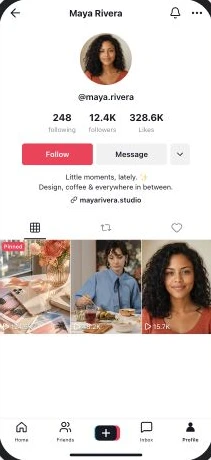
Build the profile behind your next scene. Edit the bio, followers, likes, and video covers, then download your TikTok profile screenshot.

Clean PNGs without an accountPhone frame or screen-only outputEditable names, media, and details

Your scene, your details

Make the profile your own.

Start with the familiar TikTok Profile layout and edit the details that make your concept work.

  • Custom display name, username, and avatar
  • Bio, website, and verification badge
  • Following, follower, and total like counts
  • Up to 12 video covers across profile tabs
  • Video view counts and pinned covers
  • Videos, reposts, and liked-video previews
  • Owner-only private and favorites tabs
  • Light or dark mode and PNG export

Made for your next idea

What will you create?

Give a character a profile

Build a fictional creator’s account for a film, comedy sketch, or social storyboard. Make the bio and covers part of the story.

Preview a creator rebrand

Try a new avatar, username, bio, and cover direction together before presenting the concept.

Pitch a campaign account

Show how a brand or campaign could look on TikTok, with sample covers and clearly fictional engagement counts.

Three steps

From idea to screenshot.

  1. 01

    Open the editor

    Start with the TikTok Profile layout using the button above.

  2. 02

    Add your details

    Edit names, upload images, and adjust the content and layout.

  3. 03

    Preview and export

    Check your profile at phone size, then download a PNG.

How to create your TikTok Profile mockup

Start with the display name, username, and avatar. Write the bio, add a website, and set following, follower, and total like counts. These are editable mockup details, separate from any real account.

Add video cover images and their view counts. Pin covers to keep them at the front, then use the arrows to arrange covers within the pinned or unpinned group. Choose the preview tab to build a separate cover list for videos, reposts, or liked videos. The editor supports up to 12 covers in total.

Choose visitor, following, or account-owner view. Owner view adds private-video and favorites tabs. A private profile hides its content from visitors. Finish by choosing light or dark mode and a phone frame or screen-only output, then download a PNG.

Before you export

  • Use a username and bio that fit the same fictional identity.
  • Crop cover images so their subject stays visible in the grid.
  • Keep view counts and profile likes consistent with your scene.
  • Check the selected tab, viewer relationship, and private-account state.
  • Label fictional mockups when sharing them outside their original context.

FAQ

TikTok Profile generator questions

What you can customize and export.

Can I change TikTok follower and like counts?
Yes. Edit following, followers, and total profile likes independently. You can also set a view count for each video cover.
Can I add my own video covers and pinned videos?
Yes. Upload cover images, set their view counts, and mark covers as pinned. Pinned covers stay first, and arrows let you reorder covers within each group. You can add up to 12 covers across all tabs.
Can I preview reposts, liked videos, and private videos?
Yes. Use Preview tab to select videos, reposts, or liked videos and edit the covers for that tab. Account-owner view also offers private-video and favorites tabs.
Can I download a TikTok profile screenshot for free?
Yes. Download a standard PNG screenshot without an account. Choose light or dark mode and a phone frame or screen-only output before exporting.
Does this create or change a real TikTok account?
No. TheFake creates a visual mockup. It does not connect to TikTok, create an account, increase followers, or publish videos.

Explore related formats

Create your TikTok Profile mockup.

Start with the sample layout and make it yours.

Create TikTok profile