Create in your browser

Instagram Feed Mockup Generator

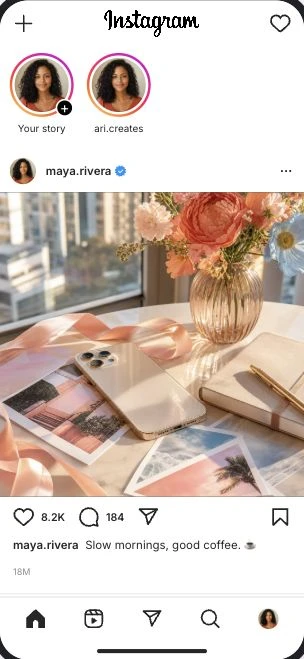
Build a feed that tells your story. Arrange Instagram posts, customize the Stories row, and preview photos, captions, and engagement in one continuous feed.

Clean PNGs without an accountPro video exportEditable names, media, and details

Your scene, your details

Make the feed your own.

Start with the familiar Instagram Feed layout and edit the details that make your concept work.

  • Multiple posts in one feed
  • Editable Stories row and avatars
  • Custom photos, captions, and authors
  • Likes and comment counts
  • Post order and scrolling timing
  • Light and dark themes
  • PNG screenshots
  • Pro scrolling video export

Made for your next idea

What will you create?

Plan a campaign feed

Preview how several campaign posts look together, including their authors, captions, and imagery.

Create a scrolling story

Arrange posts in a sequence and set pauses between them for a Pro feed video.

Show a product concept

Present an Instagram-style feed in a pitch, storyboard, or design review using fictional content.

Three steps

From idea to screenshot.

  1. 01

    Open the editor

    Start with the Instagram Feed layout using the button above.

  2. 02

    Add your details

    Edit names, upload images, and adjust the content and layout.

  3. 03

    Preview and export

    Check your scene at phone size, then download a PNG. Pro adds video export.

How to create your Instagram Feed mockup

Start with the first post, then add more entries and arrange their order. Edit each author, caption, photo, and engagement count. The Stories row has its own names and avatars, so it can support the scene independently of the posts.

A feed shows full posts in a scrolling sequence. Use the Instagram Profile generator when you want a bio, follower counts, highlights, and a grid of thumbnails instead.

Before you export

  • Choose a consistent visual theme for the posts.
  • Keep author names and avatars consistent.
  • Check long captions at phone size.
  • Preview post order and pauses before exporting video.

FAQ

Instagram Feed generator questions

What you can customize and export.

Can I add several Instagram posts to one feed?
Yes. Add feed entries, customize their content, and arrange them in the order you want.
Can I customize the Stories row?
Yes. Edit the Stories row independently, including names, avatars, viewed states, and your own Story.
Is a feed mockup the same as an Instagram profile grid?
No. A feed displays complete posts in a scrolling sequence. A profile displays account details and a grid of post thumbnails. TheFake has a separate editor for each.
Can I export an animated Instagram feed?
Pro supports scrolling feed videos with pauses between posts. You can also export a standard PNG screenshot without an account.

Explore related formats

Create your Instagram Feed mockup.

Start with the sample layout and make it yours.

Create Instagram feed