
1
Creator campaign previews
Show how a product photo and caption sit inside the TikTok feed before sending a creative concept for approval.
Create TikTok photo post mockups with creator profiles, captions, sound labels, likes, saves, comments, and shares. Download a clean PNG.
Pick the right format
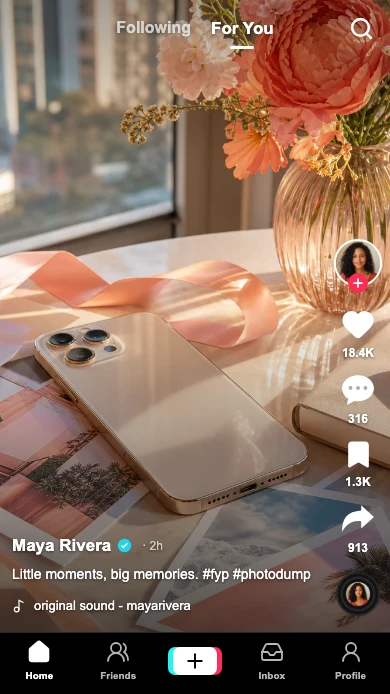
Build the post around one image. The creator, caption, sound label, and action rail give your concept its TikTok context, with every visible detail editable.
Show how a product photo and caption sit inside the TikTok feed before sending a creative concept for approval.
Build a fictional post for a skit, storyboard, or social edit with a creator profile and audience reaction counts.
Try a cover image, caption, and sound label together. Check that the action rail leaves your subject visible.
Workflow
Step 1
Open TikTok post mode with the full-screen feed layout and right-side actions ready.
Step 2
Upload a photo, edit the creator and caption, set the sound title, and adjust likes, comments, saves, and shares. Check the crop at phone size.
Step 3
Download a clean PNG for your storyboard, presentation, or social edit. Pro also supports exporting the mockup as a video clip.
Features
Set the interface cues that make a TikTok post recognizable, then export it for close-up edits.
Preview your image under TikTok-style tabs, caption overlays, an action rail, and bottom navigation.
Edit the creator profile, badge, follow state, sound label, and all four engagement counts in one place.
Add an editable comment sheet over the post, or use the TikTok comments generator for a standalone thread.
These are the details viewers notice first when a TikTok screen appears on camera.
Also included
This TikTok post generator recreates the viewing side of the feed: your photo fills the screen, the creator and caption sit at the lower left, and likes, comments, saves, and shares appear on the right.
Common mistakes
Most weak mockups fail on context, not polish. Fix these before you export.
Leave space on the right for likes, comments, saves, and shares. Check faces and product names after choosing the photo crop.
Put the hook first. A long caption can cover the photo or disappear beyond the phone preview.
The sound title is part of the screenshot. It does not upload or play a music track.
FAQ
Quick answers about workflow, realism, and export decisions.
Compare social post mockup pages when you need the same idea in a different feed.
Same platform
Create a fake TikTok comment screenshot with custom usernames, likes, creator badges and replies.
Open generatorRelated generator
Create fake Instagram posts with custom profiles, captions, photos, verified badges, likes, and comments.
Open generatorRelated generator
Create X post mockups, reply chain screenshots, profile-style previews, verified badges, and engagement metrics for social concepts, decks, and editorial visuals.
Open generatorRelated generator
Generate realistic fake Facebook posts with our free online tool.
Open generatorOpen the post editor, edit the visible details, and export the finished mockup.